Normal practice in this book has been to intersperse case studies with
philosophy. But in this chapter we'll begin by looking at several
Unix designs that exhibit transparency and discoverability, and
attempt to draw lessons from them only after all have been
presented. Each major point of the analysis in the latter half of this
chapter draws on several of these, and the arrangement avoids forward
references to case studies the reader hasn't seen yet.
First, we'll look at an example of transparency in UI design. It
is audacity, an open-source editor for
sound files that runs on Unix systems, Mac OS X, and Windows.
Sources, downloadable binaries, documentation, and screen shots are
available at the project site.
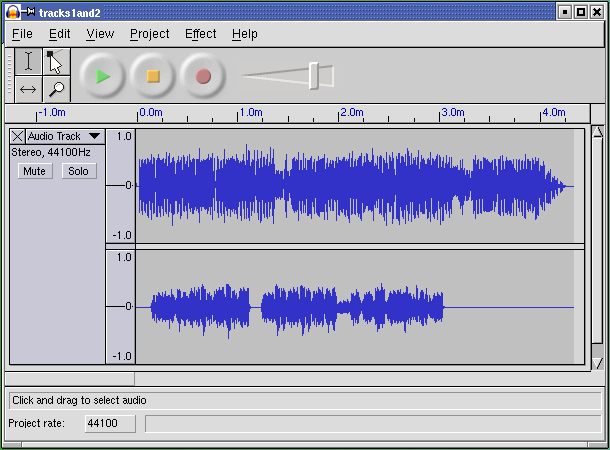
This program supports cutting, pasting, and editing of audio
samples. It supports multitrack editing and mixing. The UI is
superbly simple; the sound waveforms are shown in the
audacity window. The image of the
waveform can be cut and pasted; operations on that image are directly
reflected in the audio sample as soon as they are performed.
Multitrack editing is supported in the simplest possible way;
the screen splits into multiple per-track displays in a spatial
relationship that conveys their concurrency and makes it easy to
match features by inspection. Tracks can be dragged right or
left with the mouse to change their relative timing.
Several features of this UI are subtly excellent and worthy of
emulation: the large, easily visible and clickable operation
buttons with distinguishing colors, the presence of an undo command
that removes most of the risk from experimentation, the volume slider
that makes softness/loudness visually obvious in its shape.
But these are details. The central virtue of this program is
that it has a superbly transparent and natural user interface, one that
erects as few barriers between the user and the sound file as
possible.